Twitch

Chat Warnings

Giving moderators a better option before timeouts and bans.

As the Product Designer on Twitch’s Trust & Safety team, I worked on Chat Warnings, a feature that gave moderators an official way to communicate with users whose behavior was becoming disruptive or harmful. Through moderator interviews, workflow analysis, and iterative prototyping, I helped design a solution that filled a critical gap between taking no action and issuing punitive moderation actions. The result was a moderation tool that aligned with existing moderator behavior while creating a clearer, more authoritative experience for both moderators and users.

Understanding the Moderator Experience

To better understand the challenges moderators face, I spent several days shadowing Twitch moderators as they managed live communities. I observed how they monitored chat, responded to disruptive behavior, and balanced enforcement with maintaining a positive community experience. I supplemented these observations with moderator interviews and a review of existing moderation tools and workflows.

Twitch moderator monitoring a live chat stream at their desk.
Twitch Moderator at work

Watching moderators work in real time revealed a challenge that surfaced repeatedly: there was no clear middle ground between taking no action and issuing a timeout or ban. While these tools were effective when necessary, moderators often wanted a way to intervene earlier and encourage better behavior before escalating to punitive action.

Key Insights

Moderators had already created their own warning system.

During my shadowing sessions, I observed moderators manually typing warning messages into chat to address problematic behavior. These warnings served as an attempt to course-correct users before resorting to more severe moderation actions.

Chat messages lacked authority.

Because these warnings appeared as ordinary chat messages, they were easy for users to miss or dismiss. Moderators wanted a way to communicate that a warning was official and should be taken seriously.

Moderation works best when actions match the situation.

Moderators viewed timeouts and bans as important tools, but they preferred to reserve them for situations that truly warranted punishment. They wanted a way to communicate expectations and give users an opportunity to adjust their behavior before escalating further.

These findings revealed an opportunity to formalize an existing moderator behavior into a dedicated moderation tool—one that could help moderators intervene earlier while maintaining the safety and culture of their communities.
Identifying the Opportunity

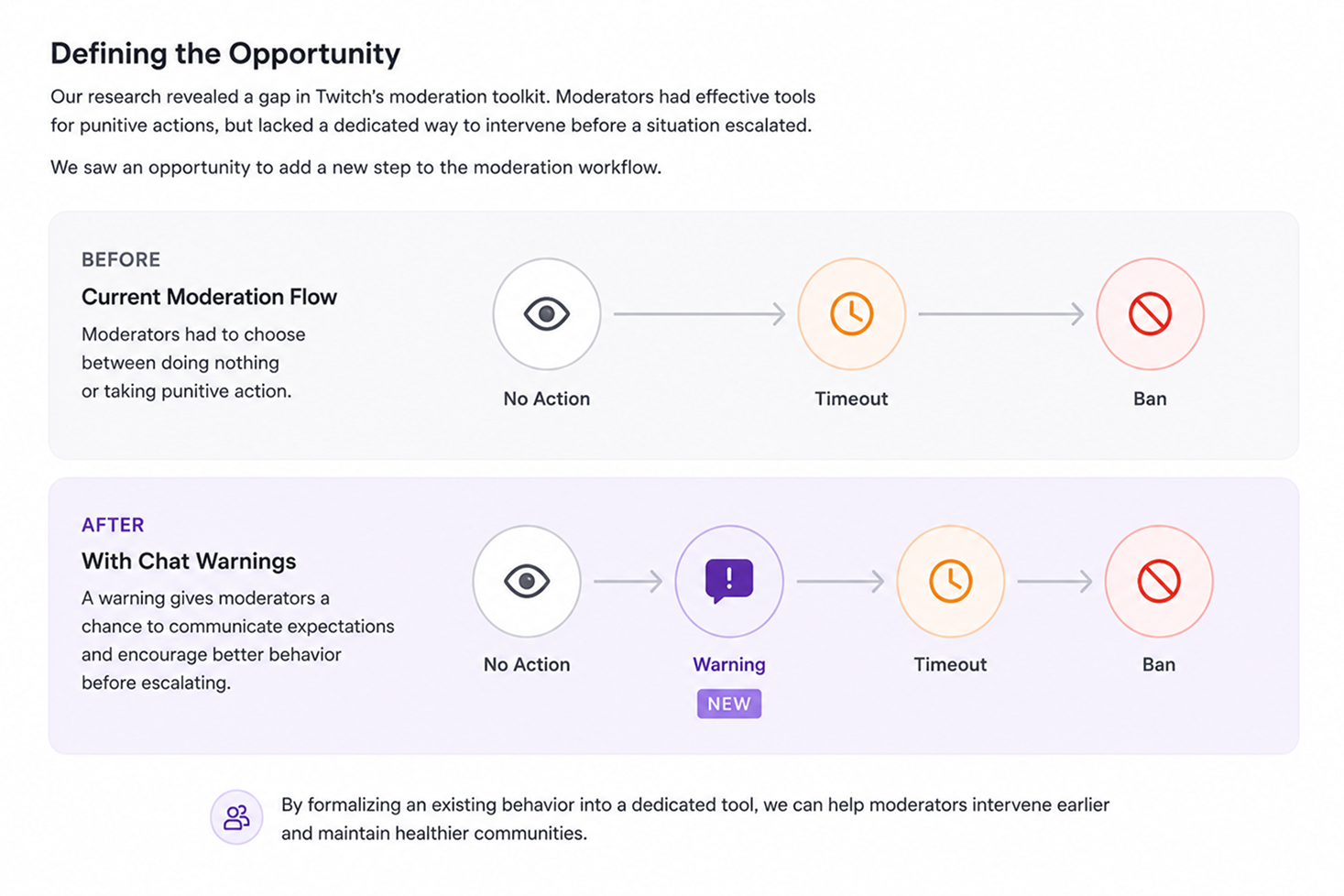
My research revealed a gap in Twitch’s moderation toolkit. Moderators had effective tools for punitive actions such as timeouts and bans, but lacked a dedicated way to intervene before a situation escalated to that point.

As a result, moderators were creating their own warning systems by manually posting messages in chat. While this approach helped communicate expectations, it lacked the visibility, authority, and consistency of an official moderation tool.

This led to the following design challenge:

“How might we help moderators address problematic behavior before resorting to timeouts or bans?”

Diagram defining the opportunity, mapping the current moderation flow against a proposed flow that adds a warning step.
Defining the opportunity — adding a warning step to the moderation flow

The goal was not to replace existing moderation tools, but to create a new step in the moderation workflow that allowed moderators to communicate expectations, encourage course correction, and maintain healthy communities with a proportional response.

By formalizing an existing moderator behavior into a dedicated product experience, we had an opportunity to make moderation more effective for moderators while providing users with a clearer understanding of when their behavior was crossing a line.

Exploring Ways to Make Warnings Matter

Research showed that moderators were already warning users through chat messages, but those warnings were easy to miss and often lacked authority. The challenge was not simply delivering a message—it was ensuring users understood that a moderator had formally intervened.

I explored several approaches that varied in visibility, disruption, and perceived authority.

Building on Existing Behavior

One direction focused on enhancing the warning messages moderators were already posting in chat. While this approach aligned with existing workflows, it did little to solve the core problem. Warnings still competed with the fast-moving chat stream and could easily be overlooked.

Creating a Dedicated Warning Experience

I then explored concepts that would temporarily interrupt the user’s experience and require acknowledgment before they could continue participating in chat. By separating the warning from the chat stream, these concepts established a clearer distinction between ordinary messages and official moderation actions.

Balancing Visibility and Disruption

The most promising concepts made warnings impossible to miss while avoiding the severity associated with timeouts and bans. The goal was to create a moment of reflection rather than punishment—a clear signal that a moderator had intervened, combined with an opportunity for the user to correct their behavior.

This exploration phase helped establish the core principles that guided the final design:

  • Official and authoritative
  • Difficult to ignore
  • Easy for moderators to issue
  • Proportional to the situation
  • Focused on behavior correction rather than punishment

These principles became the foundation for the prototypes that followed.

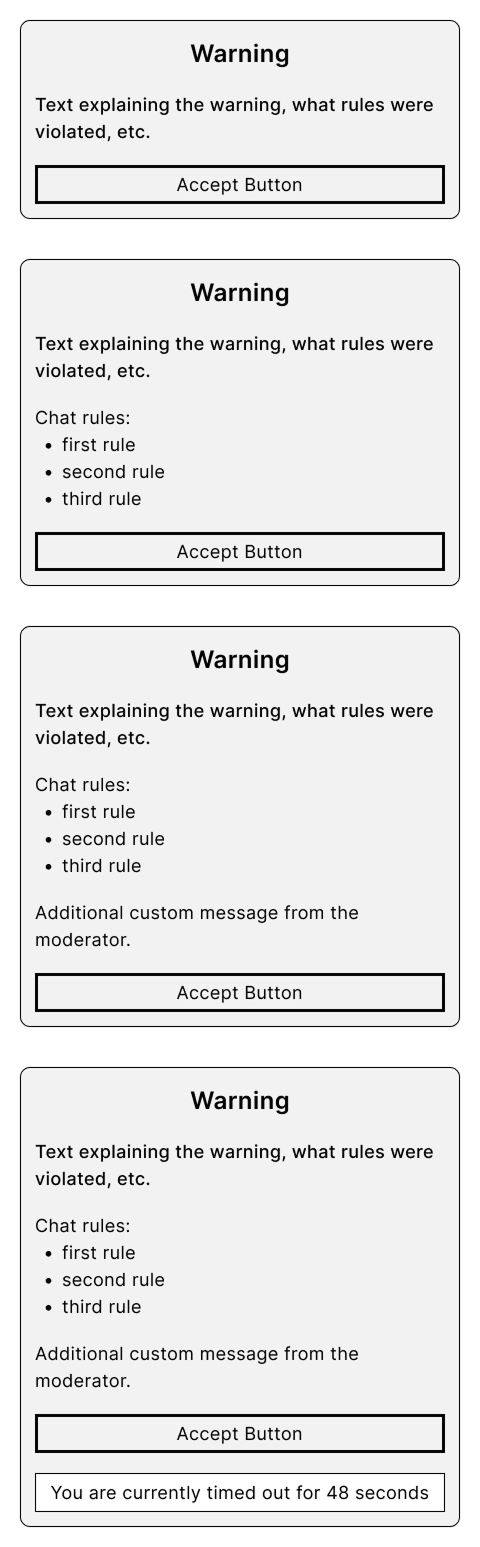
Wireframe series showing the evolution of the warning card across multiple explorations.
Evolution of the Warning card

Iterating Toward the Right Level of Intervention

With a clear set of design principles established, I began prototyping different warning experiences. The challenge was finding the right balance between visibility and disruption. Warnings needed to feel official and impossible to miss, while remaining less severe than a timeout or ban.

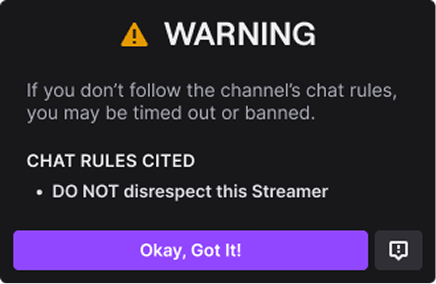
First warning prototype separating the warning from the chat stream and requiring acknowledgment.
Iteration 1: Establishing Authority
Second warning prototype adding context about the warning and the behavior that prompted it.
Iteration 2: Providing Context
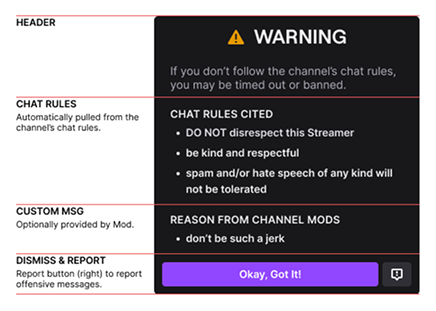
Final warning prototype adding encouragement and guidance for how to move forward.
Iteration 3: Additional Encouragement

Iteration 1: Establishing Authority

The initial concept focused on separating warnings from the chat stream and presenting them as an official moderation action. By interrupting the user’s experience and requiring acknowledgment, the warning immediately carried more weight than a standard chat message.

However, early reviews revealed that the warning lacked context. Users could see that they had received a warning, but not necessarily understand why.

Iteration 2: Providing Context

The next iteration introduced additional information about the warning and the behavior that prompted it. This helped users better understand the moderator’s intent and reduced ambiguity around what action they should take moving forward.

While the experience was clearer, there was still an opportunity to strengthen the connection between the warning and the expected behavior change.

Iteration 3: Additional Encouragement

The final iteration focused on helping users understand not only that they had received a warning, but what they could do differently going forward. Additional contextual information and clearer messaging transformed the warning from a simple notification into an opportunity for behavior correction.

The resulting design balanced moderator needs with user understanding. It was highly visible, difficult to ignore, and clearly distinct from both ordinary chat messages and more punitive moderation actions.

By iterating through multiple versions, I was able to refine the experience into a dedicated moderation tool that felt authoritative without feeling overly punitive.

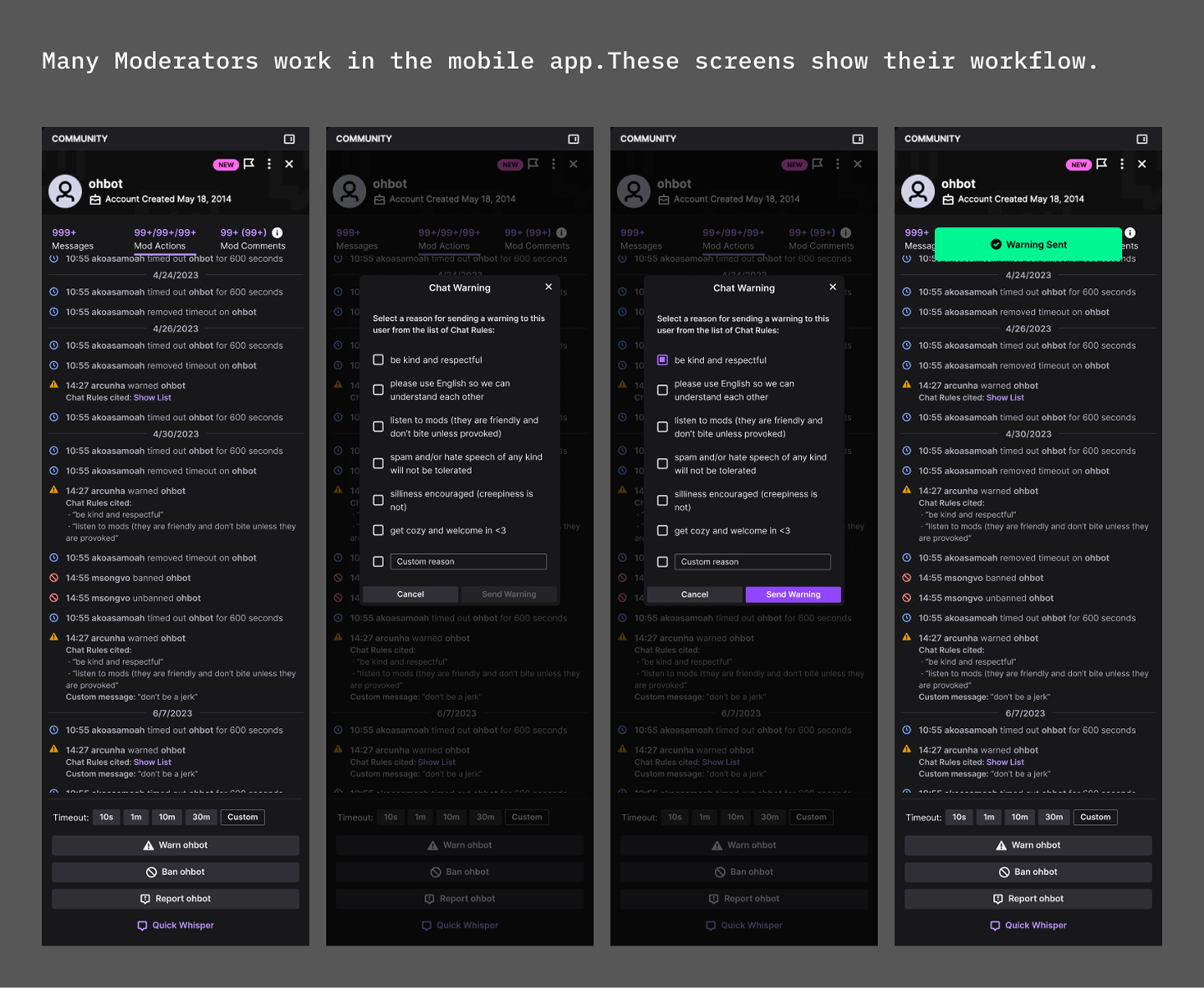
Mobile moderation workflow showing how moderators issue a chat warning across multiple screens.
Many Moderators work on the mobile app. These screens show their workflow.

Key Learning: Users needed more than a warning—they needed enough context to understand what happened and how to move forward.

Testing with Moderators

As prototypes matured, I shared them with moderators to gather feedback and evaluate whether the proposed solution fit naturally into their existing workflows. Because moderators would ultimately determine the success of the feature, it was critical to ensure the experience addressed their needs without adding unnecessary complexity.

Feedback from these sessions was overwhelmingly positive. Moderators immediately understood the purpose of the feature and saw it as a natural extension of behaviors they were already performing manually. The concept of an official warning resonated strongly because it provided a more visible and authoritative alternative to warning users through chat messages.

Refining the Experience

Moderator feedback helped identify opportunities to improve clarity, messaging, and the overall user experience. Through multiple rounds of refinement, the warning experience became easier to understand, more actionable for users, and more effective at communicating moderator intent.

The validation process also reinforced one of the key findings from discovery research: moderators were not looking for another punitive tool. They wanted a way to communicate expectations and encourage better behavior before escalating to more severe actions.

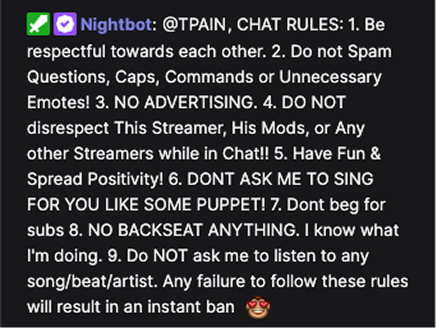
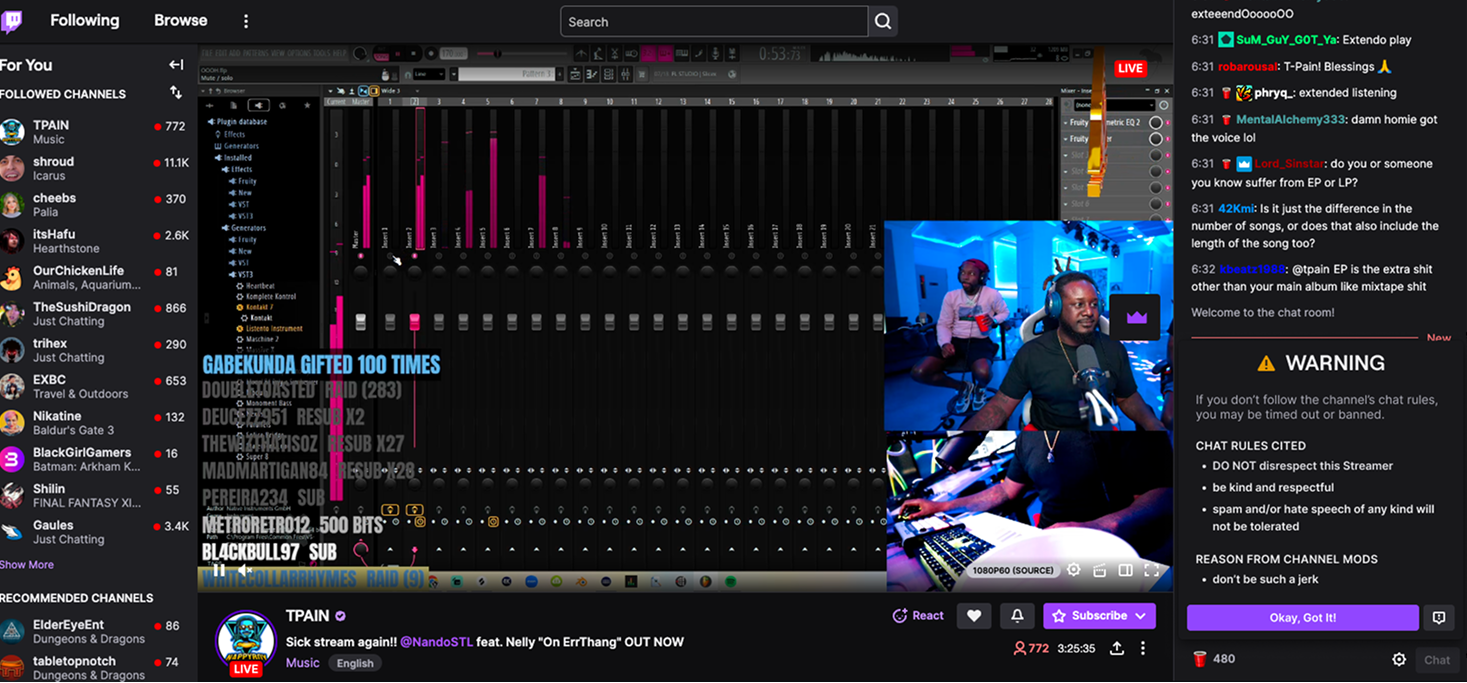
TPain’s Twitch channel page with a chat warning being shown to the user.
TPain’s channel page with a warning being shown to the user

Preparing for Launch

As the design matured, I worked closely with product managers and engineers to ensure the solution could be implemented effectively across Twitch’s moderation ecosystem. By grounding design decisions in moderator feedback throughout the process, we were able to move forward with confidence that the feature solved a real problem and aligned with the way moderators actually worked.

The final design transformed an informal moderator workaround into an official moderation tool that fit naturally into existing workflows while creating a clearer experience for users.

From Workaround to Official Tool

Chat Warnings launched as an official moderation tool on Twitch, giving moderators a dedicated way to address problematic behavior before escalating to timeouts or bans.

The feature resonated quickly with moderators because it formalized a behavior many were already performing manually. Rather than introducing a new workflow, Chat Warnings made an existing moderation practice more visible, consistent, and authoritative.

Within weeks of launch, adoption exceeded expectations. Moderators across Twitch incorporated Chat Warnings into their moderation workflows, and the feature quickly became one of the most widely used tools in the moderation toolkit. Community response was equally positive, with moderators praising the feature on Reddit and other community channels for addressing a longstanding gap in Twitch’s moderation experience.

Key Takeaways

The best solutions often formalize existing user behavior.

The strongest signal during research wasn’t what moderators said they wanted—it was what they were already doing. Observing moderators create their own warning systems revealed an opportunity to improve an established workflow rather than invent a new one.

Authority is a critical part of Trust & Safety design.

Warnings delivered through ordinary chat messages lacked the visibility and legitimacy moderators needed. The final design demonstrated that how a message is delivered can be just as important as the message itself.

Effective moderation is about proportional response.

Moderators didn’t need another punitive tool. They needed a way to intervene earlier and guide behavior before escalating to more severe actions. Chat Warnings helped fill that gap, giving moderators more flexibility while supporting healthier communities.

Next case study Channel Tags